

Command line version
MateSel supports a command line (batch) version which supports automated runs of MateSel. This is commonly used when frequent (e.g. weekly) matings are required and for research simulations.
Generate Command Line Script
Section titled “Generate Command Line Script”The suggested workflow for automating MateSel runs is to first use the GUI to configure your breeding program objectives and then export that configuration for use in the command line version. After setting your targets in the MateSel GUI, click the Stop Run button and follow these steps:
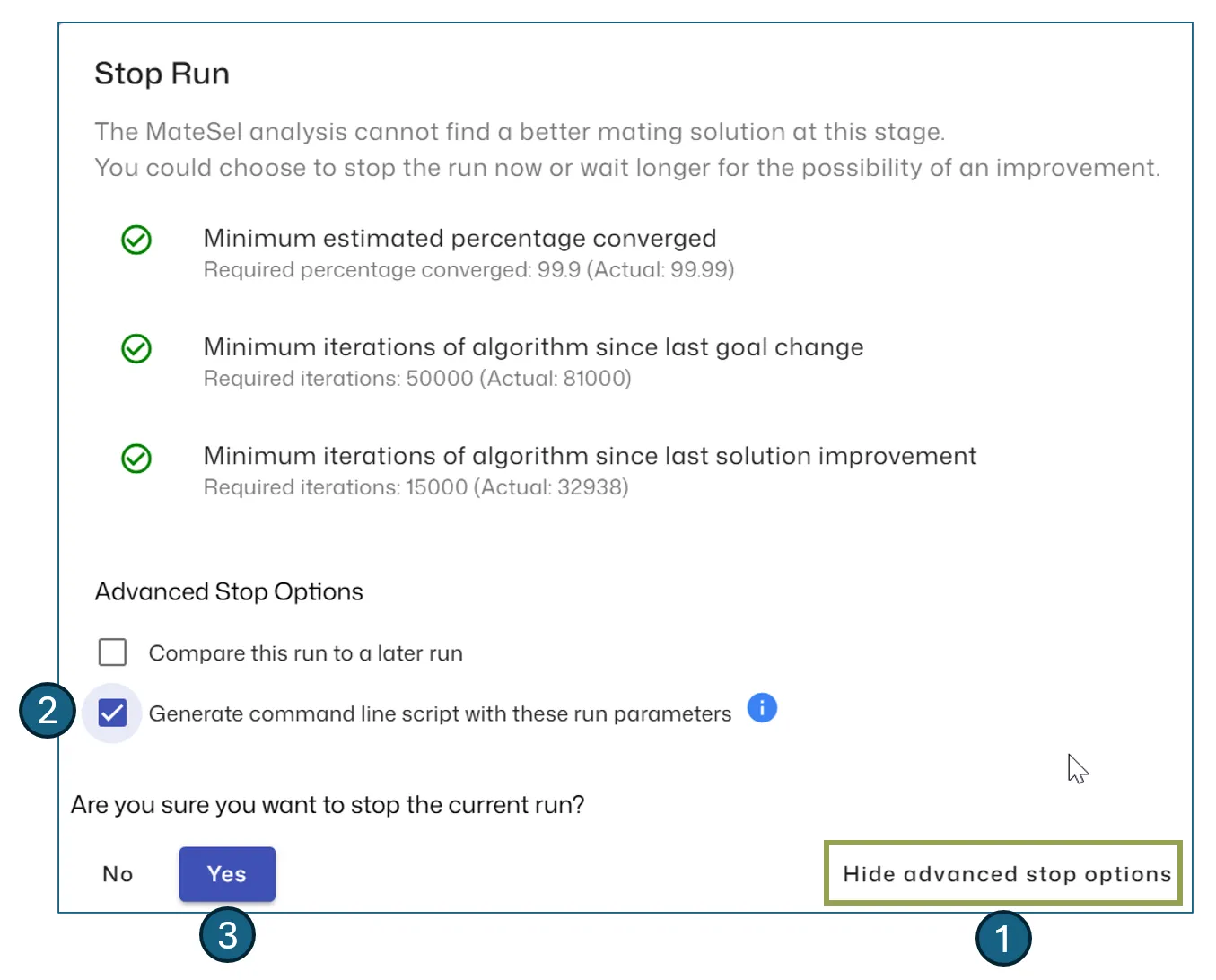
- Click the Show/Hide advanced stop options button
- Select the Generate command line script with these run parameters checkbox
- Click Yes to stop the run
- Using File Explorer, navigate to your data file and open the generated commandline folder
Generated Files
Section titled “Generated Files”The following files are generated:
| File | Description |
|---|---|
| Run_MateSel.cmd | This script provides direction on how to call MateSel from the commandline |
| MateSel.csv | Your main data file |
| MateSel.ini | You main configuration, in the same format used by MateSel Legacy. |
| Others | Depending on the type of MateSel run, there may be other configuration files e.g. for grouping etc. |
Executing Run_MateSel.cmd should start the MateSel run, however, you will need a Run Token file to run the command line version, see below.
Obtaining a Run Token
Section titled “Obtaining a Run Token”The command line version requires that you have a valid RunToken.txt file located in the same directory as the MateSel program OR the same directory as your main data file. To obtain a run token:
- Login to www.matesel.com
- Navigate to the Download menu item
- Click on the Get Batch Token button and follow the instructions from there. You will see we also support an automated approach for obtaining batch run tokens via API for those that need this facility.
Monitoring Progress
Section titled “Monitoring Progress”To monitor progress of the MateSel command line process, open the Console.txt file in a non-locking text viewer/editor. Non-locking so that MateSel can still write to this file. The run will stop when the criteria for stopping have been met.
Setting Criteria for Stopping
Section titled “Setting Criteria for Stopping”There are several ways of deciding when there has been sufficient solution convergence. These can all be set in MateSel.ini and applied simultaneously:
| Setting | Description |
|---|---|
| ConvergePercentTarget | The solution must exceed a specified percentage of the current predicted asymptotic maximum solution. 99.9% is the default. |
| MinNewGens | No improvement for a specified fixed number of generations since the last improvement. This is an extra safeguard against premature stopping. |
| AbsMinNewGens | No fewer than nmin generations in total. |
| MaxNewGens | No more than nmax generations in total |
| NoChangePercent | No improvement over the last pnc percent of nlast generations, where nlast is the last generation in which the best solution improved on the best solution in the previous generation, and pnc is a percentage. It can be >100%. |
Breaking Changes from MateSel Legacy
Section titled “Breaking Changes from MateSel Legacy”If you have previously been using the command line version shipped with MateSel Legacy, there are a number of changes to the report files:
- OutResultsDLL.txt and OutBackupsDLL.txt are no longer created. Please use OutResults.csv/txt and OutBackups.csv/txt.
- OutResults.csv/txt no longer contains backup sires. Please get these from OutBackups.csv/txt
- OutSireUseDLL.txt has been renamed to OutSireUse.txt
- OutSireUse.txt now reports sire id, not the sire sequence id
- OutSummary.txt no longer contains trait outcomes. Please get these from OutTraits.txt/json.
The following additional report files are now generated for easier integration with other systems:
- OutSummary.json
- OutTraits.json
- OutMarkers.json
- OutSireUse.json
- OutGroups.json